> ## Documentation Index
> Fetch the complete documentation index at: https://docs.chessa.ai/llms.txt
> Use this file to discover all available pages before exploring further.
# Order Lifecycle
> The Chessa API order process follows a well-defined lifecycle that ensures secure and reliable money transfers. Below is a step-by-step breakdown of the order journey.
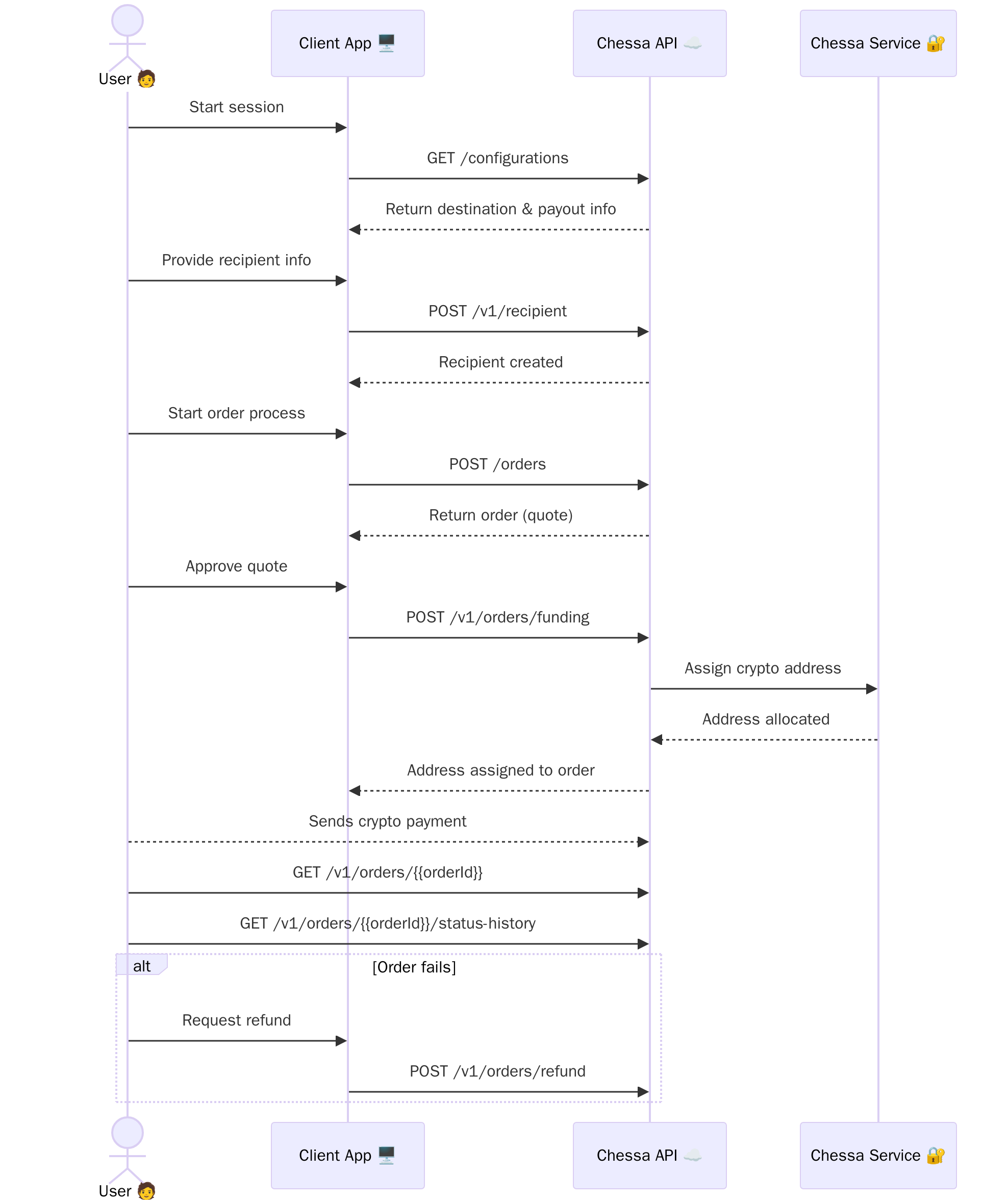 ## 1. Get Configuration Information
Before creating an order, call `GET /v1/configurations` to retrieve essential information about:
* Supported destination countries
* Available payout methods
* Supported banks for each country
* Required fields for different payout types
* Currency information
This step is crucial as it provides all the reference data you'll need to create a valid order and present options to your users.
## 2. Create a Recipient
Before creating an order, you need to create a recipient record by calling `POST /v1/recipient`. The recipient contains all the payout details including:
* Personal information (name, contact details)
* Bank account information or mobile money details
* Country-specific required fields (based on the configuration data)
You'll receive a `recipientId` in the response, which you'll need to reference when creating an order.
## 3. Create an Order (Quote)
Make a `POST /v1/orders` request to initiate an order, including the `recipientId` from the previous step.
The response will include a created order object, which acts as a quote for the transaction. This quote includes pricing and relevant metadata.
## 4. Prepare Order for Funding
If the quote looks good and the user is ready to pay, call `POST /v1/orders/funding`.
This assigns a unique crypto address to the order.
## 5. Pay and Monitor Order
The user sends payment to the assigned crypto address.
You can poll `GET /v1/orders/{orderId}` to retrieve full order details, or `GET /v1/orders/{orderId}/status-history` for a detailed status view.
## 6. Request a Refund (if needed)
If the order fails and its status becomes 'Failed', the user can submit a refund request by calling `POST /v1/orders/refund`.
This endpoint accepts a refund crypto address where the funds should be returned.
## Ready to Get Started?
Check out our complete API reference to start implementing the order lifecycle
in your application.
## 1. Get Configuration Information
Before creating an order, call `GET /v1/configurations` to retrieve essential information about:
* Supported destination countries
* Available payout methods
* Supported banks for each country
* Required fields for different payout types
* Currency information
This step is crucial as it provides all the reference data you'll need to create a valid order and present options to your users.
## 2. Create a Recipient
Before creating an order, you need to create a recipient record by calling `POST /v1/recipient`. The recipient contains all the payout details including:
* Personal information (name, contact details)
* Bank account information or mobile money details
* Country-specific required fields (based on the configuration data)
You'll receive a `recipientId` in the response, which you'll need to reference when creating an order.
## 3. Create an Order (Quote)
Make a `POST /v1/orders` request to initiate an order, including the `recipientId` from the previous step.
The response will include a created order object, which acts as a quote for the transaction. This quote includes pricing and relevant metadata.
## 4. Prepare Order for Funding
If the quote looks good and the user is ready to pay, call `POST /v1/orders/funding`.
This assigns a unique crypto address to the order.
## 5. Pay and Monitor Order
The user sends payment to the assigned crypto address.
You can poll `GET /v1/orders/{orderId}` to retrieve full order details, or `GET /v1/orders/{orderId}/status-history` for a detailed status view.
## 6. Request a Refund (if needed)
If the order fails and its status becomes 'Failed', the user can submit a refund request by calling `POST /v1/orders/refund`.
This endpoint accepts a refund crypto address where the funds should be returned.
## Ready to Get Started?
Check out our complete API reference to start implementing the order lifecycle
in your application.